The Short Answer: Yes, QuickBooks Can Forecast Cash Flow
Yes, QuickBooks Online can forecast cash flow. It includes a 13-week cash flow forecast, tools for expected incoming and outgoing payments, AI-assisted predictions, manual projections, and ways to monitor future cash balances.
But here's the real question you need to ask: Does QuickBooks give you enough to actually trust the forecast when making decisions?
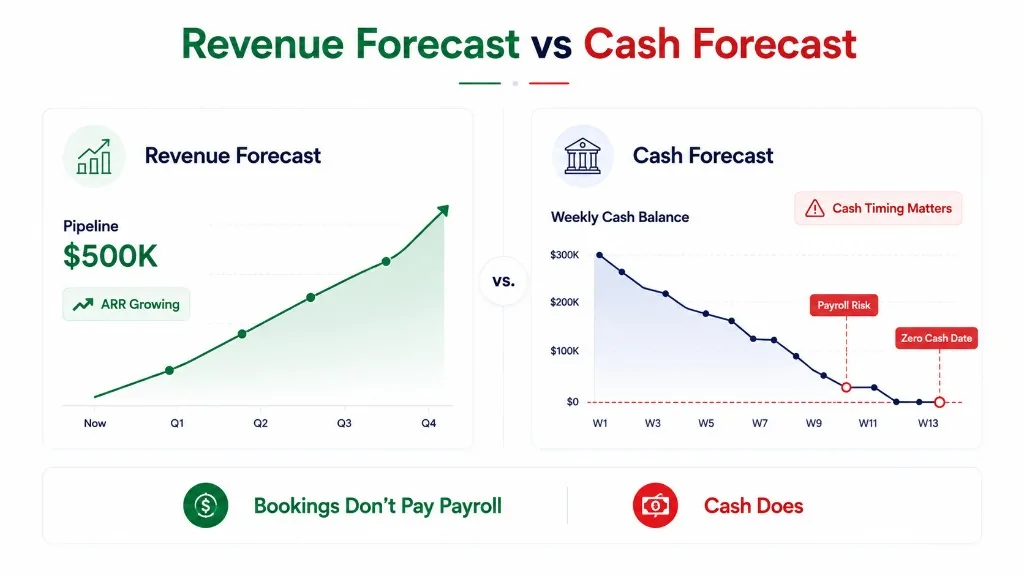
A forecast can show that your business has enough cash at the end of the month while you're still facing a shortage halfway through it. An invoice expected next Tuesday may not get collected for another three weeks. Payroll, meanwhile, doesn't wait.
Understanding what QuickBooks can actually forecast, what assumptions drive those forecasts, and how to validate the results before making financial decisions is essential.
In this guide, we'll walk through QuickBooks' built-in forecasting features, show you how to create a cash flow forecast, examine its limitations, and explain when it might make sense to bring in a dedicated forecasting tool.
What QuickBooks Can Forecast (and What That Actually Means)
QuickBooks Online provides native cash flow forecasting that uses your accounting data to estimate future cash inflows, outflows, and balances.
According to Intuit's help pages, the 13-week cash flow forecast is available in QuickBooks Online Simple Start, Essentials, Plus, and Advanced subscriptions.
This forecast helps you answer practical questions:
- How much cash might be available over the next 13 weeks?
- Which invoices are expected to be collected?
- What bills and expenses are coming due soon?
- When could your business dip below its minimum cash balance?
- How would changing a payment timing affect your projected cash?
Here's an important distinction: cash flow forecasting is about when money moves, not just when revenue is earned or expenses are recorded.
For example, a business might recognize $50,000 in revenue on its books this month but not collect $20,000 of it until next month. Its profit-and-loss statement would look healthy, but its bank account would tell a very different story.
That's where a cash flow forecast comes in: it connects those two realities.
QuickBooks Cash Flow Forecasting Tools at a Glance
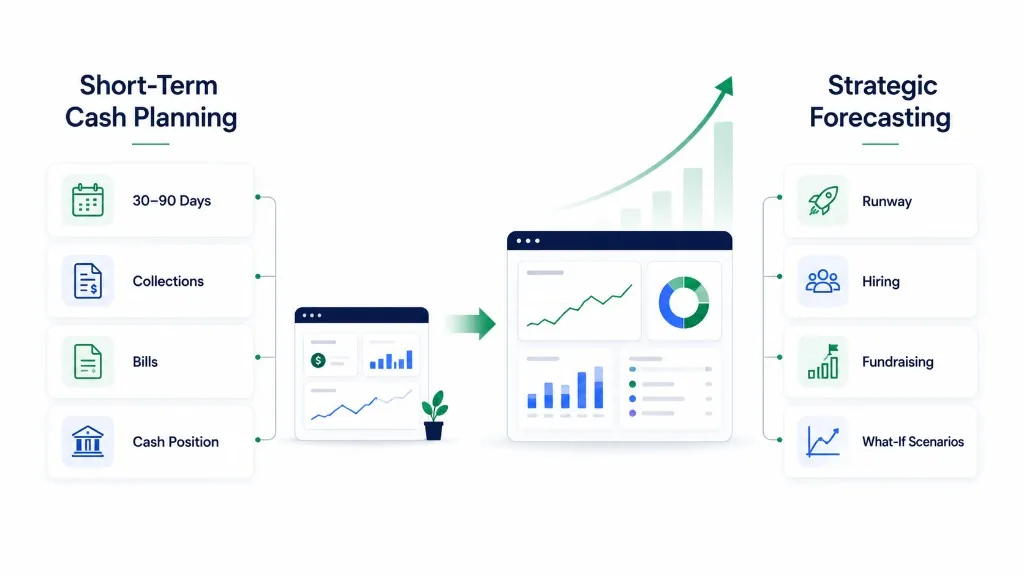
QuickBooks has several forecasting capabilities, but they serve different purposes. Some focus on short-term cash availability; others help project broader business performance.
Here's what QuickBooks currently documents:
| Feature | What it does |
|---|---|
| 13-week cash flow forecast | Projects expected cash movement and balances over 13 weeks |
| AI-assisted predictions | Uses historical activity to help estimate future cash events |
| Manual cash projections | Lets you add anticipated income or expenses not yet in the books |
| Cash flow chart | Shows cash movement over daily, weekly, or monthly periods |
| Cash threshold | Displays a reference line for your minimum desired cash balance |
| Cash runway | Estimates how many months your available cash may last |
| Forecast exports | PDF summaries and Excel/CSV export options |
| Intuit Intelligence | Broader 12-month financial projections and scenario analysis |
| Enterprise Suite forecasting | Additional workflows, including three-way financial modeling |
Feature availability, interfaces, and subscription requirements can differ by plan and region. In particular, Enterprise Suite is a separate Intuit product, not part of QuickBooks Online plans.
1. The 13-Week Cash Flow Forecast Grid
QuickBooks Online provides a 13-week forecast organized around four components:
- Beginning cash balance – Cash available at the start of a period
- Money in – Actual and expected incoming cash
- Money out – Actual and expected outgoing cash
- Ending cash balance – The projected cash position at the end of the period
You can expand account groups and inspect the transactions behind each forecast total.
For future periods, the grid can include open invoices, recurring bills, manual projections, and AI predictions.
QuickBooks also lets you update expected dates or exclude specific transactions without changing the original invoice or bill. That makes the grid useful for answering an operational question: What happens to cash if the timing of a payment changes?
Source: Intuit, Cash flow forecast grid
2. Manual and AI-Suggested Projections
Not every future cash event has already been entered into your accounting system.
Consider a business planning to purchase equipment in six weeks. The purchase may not exist as a bill yet, but it could materially affect the company's cash position.
QuickBooks allows you to add one-time or repeating projections for anticipated income and expenses: think upcoming equipment purchases, potential client contracts, recurring expenditures, or irregular payments that haven't been recorded.
These projections are for planning only; they don't modify the underlying accounting records.
QuickBooks also suggests cash flow projections based on historical transaction patterns. In the workflow, you'll see suggested items and can review and accept or reject them before adding to the forecast.
Important distinction: An automatically generated prediction in the forecast grid is not necessarily the same as an AI-suggested projection awaiting your acceptance.
Source: Intuit, Create and manage projections
3. Cash Runway, Thresholds, and Chart Views
QuickBooks includes a cash flow chart that can display historical and projected activity using daily, weekly, or monthly intervals.
You can also define a minimum cash threshold; say, a business that needs at least $40,000 available for payroll and essential expenses can use that as a visual reference line when reviewing its projected balance.
QuickBooks also offers a cash runway summary, which estimates how many months your available cash may last based on average spending over the previous three months.
Runway provides a summary. Cash timing reveals the risk.
Source: Intuit, Cash flow chart and runway
4. Intuit Intelligence and Broader Financial Scenarios
QuickBooks' forecasting capabilities extend beyond its operational cash flow page.
Intuit Intelligence supports 12-month financial forecasts and scenario analysis, using historical QuickBooks data to project business performance, including income, expenses, and cash flow.
For example: What happens to cash flow if we hire another employee next quarter?
Intuit's August 2026 documentation describes Intelligence forecasting as available across U.S. QuickBooks Online subscriptions and Intuit Enterprise Suite, with specific restrictions for certain functionality.
Intuit recommends at least two years of transaction history for accurate forecasts. Converting an Intelligence forecast into a budget requires QuickBooks Online Advanced.
These broader forecasts are distinct from the 13-week cash flow grid. For finance teams, the distinction is between projecting overall financial performance and managing the timing of actual cash receipts and payments.
Source: Intuit, Forecast with Intuit Intelligence
How to Forecast Cash Flow in QuickBooks Online (Step by Step)
You don't necessarily need a separate spreadsheet or forecasting application to get started. Here's how to create and review a QuickBooks Online cash flow forecast using Intuit's documented workflow.
Step 1: Navigate to the Cash Flow Page
In QuickBooks Online, navigate to:
Reports → Financial planning → Cash flow
You should see an overview of your cash position, receivables, payables, and cash runway, along with forecasting views.
If your interface refers to "Cash Flow Planner" instead, check the available planning options for your subscription. QuickBooks documentation includes both newer Cash flow instructions and references to its earlier planner experience.
Step 2: Confirm Your Starting Cash Balance
Before diving into future cash, confirm that the opening balance is correct.
QuickBooks allows you to use data from connected bank accounts or balances recorded in your books. Review which accounts are included.
A forecast that starts with the wrong cash balance can produce misleading results even when the projected transactions are correct.
For example, accidentally excluding a bank account holding $35,000 could make you think you have less liquidity than you actually do. Including an account containing restricted or unavailable funds could do the opposite, making you think you have more spendable cash than you really do.
Step 3: Review Open Invoices and Unpaid Bills
Check the receivables and payables sections.
Review the dates associated with expected customer payments and upcoming obligations.
Remember: An invoice due in seven days does not guarantee that payment will arrive in seven days. Likewise, a recorded bill may not reflect the date the business actually expects cash to leave its account.
Step 4: Inspect the 13-Week Forecast Grid
Examine beginning cash, money in, money out, and ending cash for each forecast period.
Look beyond just the final balance. Pay particular attention to periods with:
- Significant outgoing payments
- Unusually high expected collections
- Cash balances approaching your minimum operating threshold
Select forecast cells to inspect the underlying transactions and assumptions.
Step 5: Add Future Cash Events
Select "Manage projections" and add expected cash events that haven't been recorded yet.
For each projection, specify:
- Whether it's money coming in or going out
- The expected amount
- The date
For repeating items, set the recurrence frequency.
Examples might include a planned contractor engagement, annual insurance renewal, or equipment purchase.
Be careful not to double-count obligations already included through recorded invoices, bills, or existing forecast entries.
Step 6: Review Forecasting Settings
Check whether AI-powered forecasting is enabled.
Review how overdue invoices and bills are treated, and set a cash threshold that reflects your business's operational needs.
For example, you might define your threshold around the minimum amount needed to cover essential payments over a specified period.
Step 7: Export and Review Your Forecast
QuickBooks supports a PDF summary of the Cash flow page and Excel/CSV exports of its forecast grid.
Exporting is useful when you need to:
- Document assumptions
- Reconcile balances
- Share a planning review with another finance stakeholder
Source: Intuit, Monitor your cash balance and customize your cash flow chart
What Data Does a QuickBooks Cash Flow Forecast Use?
QuickBooks cash flow forecasting draws on a combination of accounting records, cash balances, future transactions, and user-provided assumptions.
The inputs can include:
| Data | Why it matters |
|---|---|
| Cash and bank balances | Establishes the starting cash position |
| Open invoices | Represents expected customer collections |
| Unpaid and recurring bills | Represents upcoming payments |
| Historical transactions | Helps identify patterns for AI-assisted predictions |
| Manually entered projections | Accounts for future events outside current transactions |
| Expected payment dates | Determines when forecasted cash enters or leaves |
| Account selection | Determines which balances and activity contribute to the forecast |
Not every forecast view uses exactly the same inputs. In particular, historical chart calculations, the 13-week forecast grid, and Intuit Intelligence have different documented behaviors. A limitation identified in one interface should not automatically be assumed to apply to all of them.
The broader principle is straightforward: A forecast built from accounting data reflects the information and assumptions available to the forecasting system.
If payroll hasn't been recorded, a customer is expected to pay late, or a large expenditure is missing from the plan, the resulting projection may not reflect the company's actual future cash needs.
That's why accounting data should be treated as the foundation of the forecast, not the final word on what will happen.
Example: How a Late Customer Payment Changes Your Cash Position
Let's examine how cash timing can create real risk, even when total income and expenses remain unchanged.
Imagine a small business starting the month with $100,000 in cash.
Over the next four weeks, it expects:
- Week 1: $45,000 in payroll
- Week 2: $30,000 in supplier payments
- Week 2: $60,000 from a customer invoice (expected)
Assume there are no other cash movements.
Scenario A: Customer Pays On Time
| Week | Cash in | Cash out | Ending cash |
|---|---|---|---|
| Starting balance | $100,000 | ||
| Week 1 | $0 | $45,000 | $55,000 |
| Week 2 | $60,000 | $30,000 | $85,000 |
| Week 3 | $0 | $0 | $85,000 |
| Week 4 | $0 | $0 | $85,000 |
Lowest weekly ending balance: $55,000
Scenario B: Customer Pays Two Weeks Late
Now suppose the customer delays payment until week 4.
| Week | Cash in | Cash out | Ending cash |
|---|---|---|---|
| Starting balance | $100,000 | ||
| Week 1 | $0 | $45,000 | $55,000 |
| Week 2 | $0 | $30,000 | $25,000 |
| Week 3 | $0 | $0 | $25,000 |
| Week 4 | $60,000 | $0 | $85,000 |
Lowest weekly ending balance: $25,000
What Changed?
Over the four-week period, the business still receives $60,000 and spends $75,000.
Its ending cash balance remains $85,000 in both scenarios.
But its lowest cash position changes dramatically.
- On-time payment: $55,000 minimum weekly ending cash
- Late payment: $25,000 minimum weekly ending cash
If the business requires $40,000 in reserves, the delayed-payment scenario creates a temporary $15,000 shortfall against that threshold.
Illustrative example only. These figures are not generated by QuickBooks and are not evidence of its forecasting accuracy. Balances are calculated at week-end; within-week cash could differ.
Why This Matters
A business does not necessarily run out of cash because it's unprofitable. It can encounter a cash shortage because incoming and outgoing payments happen at different times.
This is why a useful cash flow forecast should help identify not just the ending balance, but also the lowest expected cash position and when that low point occurs.
How Accurate Is QuickBooks Cash Flow Forecasting?
QuickBooks can generate forecasts using available accounting information, historical patterns, and anticipated cash events.
But no forecast should be treated as a guarantee of future bank balances.
We found no independently verified accuracy figure. Forecast quality will vary with the business, the completeness of its records, and the reliability of its assumptions.
Here are five factors that are particularly important:
1. The Accuracy of Your Starting Cash Balance
If the starting cash position is wrong, the entire projected balance curve can be shifted.
Action: Reconcile the forecast's starting point against the accounts you intend to include.
2. Customer Payment Behavior
An invoice due date is not always a realistic collection date.
If customers routinely pay late, the difference between contractual terms and actual behavior may substantially affect liquidity.
3. Completeness of Future Expenses
Expenses that aren't recorded or added as projections may be missing from the forecast.
This is particularly important for irregular obligations such as tax payments, annual subscriptions, debt repayments, and planned capital expenditure.
4. Historical Patterns Versus Future Changes
AI-assisted projections can identify recurring behavior. However, historical activity cannot fully anticipate decisions such as:
- Opening a second location
- Changing the hiring plan
- Losing a major customer
- Restructuring debt
Those changes require deliberate assumptions.
5. Frequency of Forecast Updates
A forecast created at the start of a month can become outdated as customers pay, new bills arrive, and spending plans change.
For businesses managing tight liquidity, reviewing the forecast weekly is a sensible operating practice.
The goal is not to produce a perfect prediction. It's to make financial uncertainty visible early enough to respond.
What Are the Limitations of QuickBooks Cash Flow Forecasting?
QuickBooks offers meaningful native forecasting capabilities. But finance teams should evaluate whether those capabilities fully support their operating needs.
1. Forecasts Depend on Available Inputs
QuickBooks cannot be expected to accurately incorporate every future business decision unless the relevant information is available or entered into the planning workflow.
A planned expansion, upcoming tax obligation, or expected late-paying customer may require explicit adjustments.
This is a general limitation of data-driven forecasting, not a problem unique to QuickBooks.
2. Cash Runway Is Not the Same as Payment-Timing Forecast
QuickBooks' runway card uses recent average spending to estimate how long cash may last.
That is different from identifying the first future day or week when the cash balance might fall below a minimum threshold.
A business with several months of runway can still face a short-term payment-timing problem.
3. Different Forecasting Tools Answer Different Questions
| Tool | Best for |
|---|---|
| 13-week forecast grid | Short-term cash activity and timing |
| Intuit Intelligence | Broader 12-month financial forecasts and scenarios |
| Enterprise Suite | Advanced financial modeling |
Users should select the workflow that matches the decision they're making rather than assuming these features are interchangeable.
4. Scenario Management May Need Additional Workflow Design
QuickBooks supports manual projections, adjustments, and Intelligence scenario analysis.
However, a finance team may still need a specific process for:
- Maintaining a baseline forecast
- Comparing alternatives
- Recording assumptions
- Communicating decisions to stakeholders
The important evaluation question is not simply whether scenario analysis exists. It's whether the available workflow supports your team's required review frequency, detail, and accountability.
5. Multi-Client Reporting Can Introduce Operational Complexity
A fractional CFO responsible for several businesses may need to review liquidity across multiple QuickBooks companies.
That raises practical questions about:
- Switching between clients
- Standardizing forecasts
- Identifying which clients require attention
- Tracking changes across a portfolio
The Intuit documentation reviewed for this article does not establish a complete native multi-client cash forecasting workflow.
Teams with these requirements should test their actual operating process before concluding that an additional application is necessary.
When Is QuickBooks Enough, and When Do You Need Another Tool?
For many small businesses, QuickBooks' native forecasting tools may be sufficient.
If the primary goal is to estimate upcoming cash receipts, review bills, add occasional projections, and identify potential shortages, its built-in functionality is a reasonable place to start.
The decision to add software should depend on the financial questions that remain difficult to answer.
| Business need | What to evaluate |
|---|---|
| Review expected cash over the next 13 weeks | QuickBooks' native forecast grid |
| Add planned purchases and recurring expenses | QuickBooks' manual projections |
| Explore a hiring or expense scenario | Intuit Intelligence (if subscribed) |
| Compare forecasted cash with actual results repeatedly | The required variance analysis and review workflow |
| Monitor several client companies | Portfolio visibility and standardized reporting |
| Test numerous operational decisions | Assumption control, scenario comparison, and auditability |
| Identify cash shortfalls before major commitments | Forecast timing, thresholds, and update frequency |
Where Dedicated Cash Flow Forecasting Software Fits
Solutions such as Float, Fathom, and Dryrun offer QuickBooks-connected financial planning and forecasting capabilities.
Their workflows vary, with different emphases on short-term cash visibility, financial statement forecasting, scenario planning, and multi-entity reporting.
A dedicated solution may be useful when the work extends beyond generating a forecast into maintaining and acting on it.
For example, a finance operator might need to determine:
- How a delayed customer payment changes the ability to fund payroll
- How an expense decision affects runway
- Which clients in a portfolio need immediate attention
Those are workflow requirements to assess, not proof that QuickBooks lacks basic forecasting.
How Zensus Approaches Cash Flow Planning
At Zensus, our focus is helping business owners and finance operators move from historical financial records toward forward-looking cash flow decisions.
Our cash flow forecasting workflow is designed around using financial data, examining projected cash balances, and exploring what-if questions.
QuickBooks provides an accounting foundation. Forward-looking planning builds on that foundation by helping teams consider what could happen next.
The objective isn't to replace sound accounting. It's to help finance teams turn financial information into decisions they can evaluate before cash moves.
QuickBooks Cash Flow Forecast Review Checklist
Before relying on a forecast for an important financial commitment, work through these seven checks:
1. Reconcile Starting Cash
Confirm that the opening balance matches the intended bank and accounting accounts.
2. Confirm Account Coverage
Check which cash accounts are included and whether any funds are restricted or unavailable for operating use.
3. Review Collections
Compare invoice due dates with realistic customer payment expectations.
4. Verify Outgoing Payments
Confirm payroll, supplier payments, taxes, financing obligations, and other material cash needs.
5. Add Missing Future Events
Include relevant planned expenses or receipts that aren't yet reflected in the books, without double-counting existing items.
6. Separate Assumptions from Commitments
Distinguish signed contracts and scheduled payments from speculative revenue or discretionary spending.
7. Reconcile Forecast Against Actual Cash Weekly
Compare what was expected with what happened, investigate significant differences, and update future assumptions.
This process helps turn a one-time projection into a maintained financial planning tool.
A useful forecast is not simply one that looks reasonable when it's generated. It's one that can be reviewed, challenged, and improved as new information becomes available.
The Bottom Line
QuickBooks has evolved beyond basic historical accounting reports. Its built-in forecasting tools can project cash balances, incorporate expected payments, model planned transactions, and support forward-looking financial analysis.
For many businesses, that may be enough.
But the most important question isn't simply whether QuickBooks can forecast cash flow.
It's whether the forecast reflects the way cash is likely to move through your business.
A single delayed invoice can change your lowest cash balance. An unrecorded expense can alter your spending capacity. A month-end balance can conceal a shortage that occurs two weeks earlier.
The value of cash flow forecasting comes from making those possibilities visible before they become problems.
Start with the data in QuickBooks. Validate the assumptions. Review the timing. Then use the forecast to make better decisions.
Related guides:
- QuickBooks Online cash flow forecasting with Zensus: a week-by-week projection built on your books.
- What is cash flow forecasting?: the four building blocks of any forecast.
- What is a 13-week cash flow forecast?: the weekly model behind the QuickBooks grid.
- MCP vs CLI for finance teams: what to check before letting AI query your QuickBooks data.
Zensus helps business owners and finance operators explore forward-looking cash flow decisions using connected financial information and scenario planning.
QuickBooks is a trademark of Intuit Inc. Zensus is an independent product and is not affiliated with or endorsed by Intuit.