So you just checked your HubSpot dashboard. It says you've billed $60,000 this month. Pretty solid, right?
Then you glance at your bank account... and that's when the reality check hits.
Some customers haven't paid yet. Others are still within their payment terms. A subscription renewal is scheduled for next week, but you're nervous: will it clear on time? And there's this payment marked as "successful" that... actually, has it really made it to the bank?
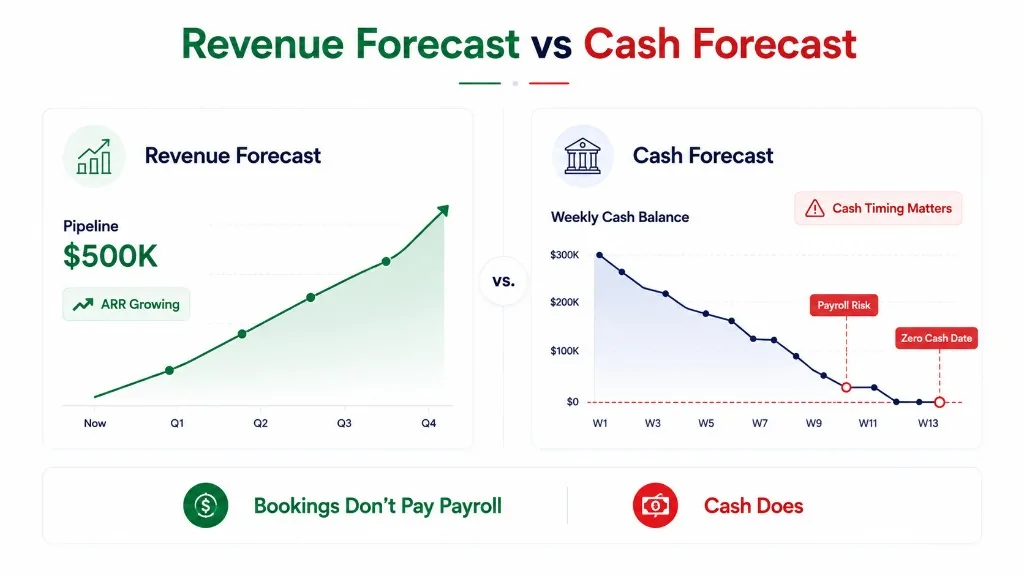
Here's the truth: you can have the revenue in HubSpot, but not the cash in the bank.
That's the problem. And if you're trying to forecast cash flow from HubSpot alone, you're going to end up more confused than when you started.
The Simple Truth: HubSpot Shows Revenue, Not Cash
To forecast actual cash flow from HubSpot, you need to start with something more concrete than sales reports: open invoices, outstanding balances, due dates, and scheduled subscription billing.
Then you estimate when each payment will actually arrive: not when it's due, not when the contract is signed, but when that money hits your bank. Adjust for how your customers typically pay, factor in processing delays, and make sure the receipts line up with what your bank shows.
The result? A cash collection forecast that tells you not just "how much" customers owe, but when that money will be available to spend.
Here's Where Most People Go Wrong
Revenue ≠ Cash (And HubSpot Reports Differently)
HubSpot's documentation is pretty clear about this: it separates pipeline forecasts, booked revenue, billed revenue, and collected revenue. Each represents a different stage of the financial lifecycle.
| Stage | What It Means | Does It Mean You Have Cash? |
|---|---|---|
| Sales deal | Someone's interested | Nope |
| Contract signed | They're committed | Nope |
| Invoice sent | You sent the bill | Nope |
| Payment sent | They're making payment | Maybe |
| Payment succeeded | HubSpot sees it | Maybe |
| Money in the bank | It's actually yours | Yes |
Let me give you an example that matters.
Imagine you land a $24,000 annual software contract in October. The invoice goes out in November. Your customer has Net 30 payment terms, but they typically pay about ten days late.
That means your deal closed in October, but you probably won't see the cash until December.
If you're forecasting that entire $24,000 as October cash, you're painting a rosier picture than reality. And that's risky when you're budgeting, covering payroll, or planning investments.
What Data Do You Actually Need?
You don't need every single field in HubSpot to build a useful cash forecast. Focus on the three questions that matter:
- How much money is still expected?
- When will it likely arrive?
- Has it already been collected or deposited?
Three types of records will do the heavy lifting.
1. Invoices: Your Short-Term Collection Radar
Start with your invoices. An invoice is a concrete billing event: you know exactly what you billed and when.
HubSpot tracks invoice statuses like Draft, Open, Paid, and Void. Here's what they mean for forecasting:
| Status | Action |
|---|---|
| Draft | Skip it for now, unless you're certain it's going to get sent |
| Open | Include it in your forecast (minus any payments already received) |
| Paid | Already collected: match it against your bank records |
| Void | Don't count it |
Here's the thing many people miss: an "Open" invoice doesn't mean nothing's been paid yet.
For example, your customer might have paid $4,000 against a $10,000 invoice. The invoice still shows as "Open," but your forecast shouldn't count the full $10,000. It should only forecast the remaining $6,000. Otherwise, you're counting the same money twice.
2. Subscriptions: The "Predictable but Risky" Category
Unlike invoices, subscriptions can help you estimate future recurring billing. But they're not a cash crystal ball.
Imagine two SaaS companies, both reporting $12,000 in Monthly Recurring Revenue (MRR):
- Company A collects $12,000 every single month
- Company B collects $144,000 annually (one big upfront payment)
Same MRR, but their cash flow patterns are worlds apart. Company A gets smaller, frequent inflows. Company B gets hit with one big payment once a year, then months with little from that contract.
If you just look at MRR, both might appear to collect $12,000 monthly. Wrong for Company B.
To forecast subscription cash correctly, you need to preserve the actual billing frequency and account for real-world collection timing.
HubSpot subscription statuses (Active, Scheduled, Unpaid, Paused, Canceled, Expired) each need different treatment:
| Status | How to Handle |
|---|---|
| Active | Project future billing, but factor in realistic collection timing |
| Scheduled | Start projecting from the actual start date |
| Unpaid | Don't count it in your baseline: something's wrong |
| Paused | Exclude billing during pause periods |
| Canceled | Stop projecting after cancellation |
| Expired | Only count what's already been billed |
3. Payment Records: The "Almost There" Zone
This is where most forecasts get fuzzy.
A payment showing as "Succeeded" in HubSpot doesn't always mean the money's in your bank yet.
- Processing: The customer clicked pay, but nothing's confirmed yet
- Succeeded: Payment processor says "done," but has the money left the payment processor?
- Failed: Back to square one. Figure out if they'll retry
When you manually enter payments, a "Succeeded" status might just mean you recorded it, not that the funds have arrived.
For an accurate forecast, track two separate dates:
- Payment date: When the transaction happens
- Expected bank availability: When you can actually spend that money
This difference becomes critical if you have payroll due in three days and the payment clears in five days. Spoiler: you're short cash.
Let's Walk Through a Real Example
Imagine it's October 27, 2026, and you're building a 13-week cash forecast. Here's what you're working with:
| Record | Amount | Event Date | Expected Bank Date |
|---|---|---|---|
| Invoice INV-101 | $24,000 | Due Nov 6 | Nov 16 |
| Invoice INV-102 | $12,000 | Due Nov 20 | Nov 13 |
| Subscription A | $6,000 | Due Nov 2 | Nov 5 |
| Subscription B | $8,000 | Failed Oct 25 | Unknown |
| Invoice INV-103 | $6,000 | Due Nov 4 | Nov 11 |
Notice three key things:
- INV-101 is due Nov 6, but the customer usually pays late. Expect it closer to Nov 16.
- INV-102 is due Nov 20, but the customer promised they'll pay early. Expect it around Nov 13.
- That $8,000 failed subscription? Put it in "at risk" territory. Don't count it in your baseline until you get it resolved.
INV-103 originally was $10,000, but $4,000 has already been paid. You're only forecasting the remaining $6,000.
Step 1: Calculate Your Expected Receipts
Your baseline forecast (before fees and other adjustments):
$24,000 + $12,000 + $6,000 + $6,000 = $48,000
That $8,000 failed subscription sits in a separate "what if" bucket for now.
Step 2: Spread It Across the Timeline
| Week | Expected Cash In |
|---|---|
| Oct 27–Nov 2 | $0 |
| Nov 3–9 | $6,000 |
| Nov 10–16 | $42,000 |
| Nov 17–23 | $0 |
| Remaining weeks | $0 |
Total over 13 weeks: $48,000
Before Nov 10: Only $6,000
See the difference? Saying "you have $48,000 coming" sounds great until you realize most of it doesn't arrive until mid-November. That changes everything if you're paying payroll or vendors on Nov 12.
Step 3: Factor in Your Cash Outflows
Let's say you start with $20,000 in the bank. Here's where the cash goes:
- Nov 6: Payroll ($15,000)
- Nov 12: Vendor bill ($10,000)
- Nov 20: Payroll ($12,000)
Your weekly cash position looks like this:
| Week | Starting Cash | In | Out | Ending Cash |
|---|---|---|---|---|
| Oct 27–Nov 2 | $20,000 | $0 | $0 | $20,000 |
| Nov 3–9 | $20,000 | $6,000 | $15,000 | $11,000 |
| Nov 10–16 | $11,000 | $42,000 | $10,000 | $43,000 |
| Nov 17–23 | $43,000 | $0 | $12,000 | $31,000 |
Bottom line: You end the month with $31,000.
But here's where most forecasts break: this hides the November 10–16 risk.
Even on schedule, cash dips to $7,000 on Nov 12, before INV-102 and INV-101 land.
For most small businesses, that's the difference between a good month and a crisis.
Here's Why Simple Due Dates Don't Cut It
So many forecasts start with invoice due dates. On paper, that seems reasonable. But it's where the cracks form.
A due date tells you when a customer should pay. It doesn't tell you when they will pay.
Example:
- Invoice due: November 6
- Customer historically: 10 days late
- Forecast (using due date only): Nov 6 ✗
- Forecast (adjusted for behavior): Nov 16 ✓
That ten-day difference could mean the difference between making payroll on time or scrambling to find emergency funding.
A Weekly Habit That Actually Matters
I used to think a cash forecast was something you build once and check once a month. I was wrong.
Here's what works better:
| What | When |
|---|---|
| Check your actual bank balance | Every Monday morning |
| Update open invoices | As payments arrive or are marked paid |
| Follow up on overdue invoices | Within 48 hours of due date passing |
| Check subscription events | Weekly when reviewing recurring revenue |
| Reconcile payments to bank | When you process payments |
| Run your forecast | Every Monday (not monthly!) |
| Test your assumptions | Move that big payment 2 weeks later: what happens? |
Track the gap between what you expected and what actually arrived. Over time, it reveals patterns. Do certain customers consistently pay 30 days late? Are your payment processing fees higher than expected?
That feedback becomes gold.
If You're Using HubSpot + QuickBooks + Stripe... Here's the Trap
So you've got:
- CRM/sales data in HubSpot
- Invoices in QuickBooks
- Payments going through Stripe
- Cash in your bank account
All these systems have records of the same underlying transactions. If you just dump them all into one forecast, you'll massively overstate your cash.
The Solution: Link Your Records
Think of it like this: one subscription renewal doesn't equal five separate cash inflows.
| Step | What Happens |
|---|---|
| Subscription is active | Plan a billing event |
| Invoice is generated | Replace the planned event with the actual invoice |
| Payment is made | Reduce the outstanding invoice amount |
| Money hits bank | Reconcile against your forecast |
Here's where it gets tricky: a QuickBooks payment might apply across multiple invoices, and HubSpot doesn't sync those payments. That's why manual reconciliation matters.
Payment Success ≠ Bank Cash
Let's say your customer pays $10,000 on Friday. Stripe marks it as successful. But Stripe doesn't transfer funds to your bank until Wednesday of next week.
If you count that money as "available" on Friday and have a $5,000 payroll due Monday... well, you might be looking at a cash shortfall.
The bank balance is what you can actually spend. Your forecast estimates what will come next.
What Do You Need to Extract?
You can build an initial forecast in a spreadsheet. Structure it like this:
| Column | Why It Matters |
|---|---|
| Source system & record ID | Know where it came from |
| Customer name | Match to your customers |
| Invoice/billing cycle ID | Track each collection once |
| Currency | Don't mess up your currency conversions |
| Status (Open/Paid/etc.) | Filter what to include |
| Outstanding amount | Only forecast what's still owed |
| Due date | Contractual timing |
| Expected receipt date | When cash actually arrives |
| Collection confidence | High/medium/low (be honest!) |
| Payment status | Processing/Succeeded/Failed |
| Bank match | Did it actually hit the account? |
For multi-currency setups, forecast in the original currency first, then apply exchange rates at the end.
A Note on HubSpot's Own Limits
HubSpot's revenue reporting is solid for what they track. But for a cash forecast, you need:
- Expected bank receipt dates (not just payment statuses)
- Your actual cash balance
- Payment settlement timing (how long from success to deposit)
- Your cash outflows (payroll, vendors, taxes, etc.)
These details vary based on your HubSpot configuration, your accounting system, and your payment processor.
Related guides:
- ARR vs cash: why recurring revenue and the bank balance disagree.
- What is a 13-week cash flow forecast?: the rolling weekly model these receipts feed.
- Will I make payroll?: checking each payroll date against expected cash.
- Can QuickBooks forecast cash flow?: what the accounting side can and cannot show.